Data protection remains a constant topic for conference organizers, even if the initial frenzy following the introduction of the GDPR has subsided. It is especially worth taking a closer look at conference websites. How well are the regulations being implemented? Our checklist will guide you through the most important points step by step.
✅Why a quick GDPR check for your conference website is a good idea:
- A GDPR-compliant website is your best protection against legal warnings.
- Your attendees can trust that their data is secure.
- In most cases, you can achieve a lot with very little effort.
1. Forms for registration, abstract submissions, or contact requests
Forms on a conference website are a direct channel for collecting personal data. Whether it's a simple contact request, conference registration, or abstract submission, every entry provides information that is subject to GDPR. At the very least, an email address or phone number for follow-up questions is always included. Registration forms often collect full names and addresses as well. Here is what you should look out for:
What data do you really need from your users?
The keyword here is "data minimization."
Only ever collect the data that you truly need for the intended purpose.
A simple contact form usually only requires a message field plus an email address or phone number. Always clearly mark which fields are mandatory. You can ask for additional information, but it should remain optional.
⚠️Registration forms are a different story: names, addresses, or payment details are necessary. Otherwise, you wouldn't be able to issue invoices or prepare name badges for your attendees later on.
If you cannot justify why specific data is truly necessary for a field, it cannot be a mandatory field and must remain optional.
Do conference attendees really need their own account?
A separate account for registration is not always necessary and often contradicts the principle of data minimization.If possible, offer a choice: registration with or without an account. Let the individual decide for themselves.
📃It is a different matter if you want to provide documents to conference attendees via the website. This could include things like certificates of attendance or workshop materials in PDF format. Anyone wanting access to these will need an account.
Are you encrypting attendee data?
As soon as you collect personal data, encryption is mandatory.
Make sure you have an SSL certificate. It ensures that the connection is secure (recognizable by “https://” and the padlock icon in the browser).
🗝️Without encryption, attackers can intercept transmitted data. This is a significant risk, especially with address or payment information. If you are unsure how to obtain a certificate, your conference software provider can help.
Do attendees know what happens to their data?
Be transparent about how you use the data that users provide.
A notice directly on the form is mandatory: a short text, a clear explanation, and a link to your privacy policy. Furthermore, data may only be processed after the individual has given their active consent.
❌Caution! The prohibition of coupling applies here.
Consent to data processing does not entitle you to automatically send newsletters to conference attendees. This requires separate consent. Include a checkbox that the person must tick to provide their explicit agreement.
2. Analytics and tracking tools
Many conference websites use analytics tools to better understand how visitors find and navigate their site. Tools like Google Analytics are still permitted, provided two conditions are met:

Do you anonymize visitor IP addresses?
Tracking tools generally collect IP addresses, which are considered personal data. The Federal Court of Justice has confirmed this. Personal data must be anonymized. For Google Analytics, a small adjustment to the tracking code is enough to truncate the IP by default.
Can website visitors opt out?
Visitors to the conference website must know if and which tracking tools you are using. They also need a way to decline tracking. Google, for example, provides an opt-out browser add-on for this purpose.
🔗Link these options clearly and visibly in your privacy policy.
3. External services and plugins
Social plugins may seem harmless, but they often collect personal data as soon as the page loads and send it to platforms like Facebook or Google. Many users are unaware of this. This makes their integration particularly sensitive under data protection law.
Does your conference website use social plugins?
Social media buttons are convenient, but they send data to the platforms as soon as they appear. Clearly state in your privacy policy that you use such plugins.
Even better: use a privacy-friendly version that only transmits data once someone intentionally clicks the button.
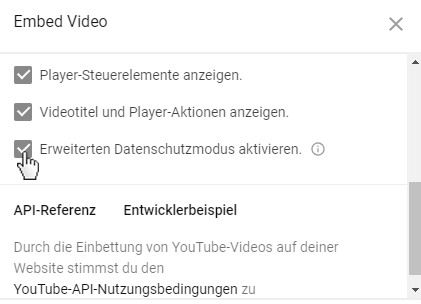
Do you use the enhanced privacy mode for videos?
If you embed videos on your conference website, they also send data to the respective platform as soon as the page loads. YouTube offers a solution for this: enhanced privacy mode. With this setting, YouTube only transmits data when someone actually plays the video.
4. Cookies
A cookie is a small file that remembers specific details related to a website visit. The next time you visit, the settings are reloaded so that, for example, the website is displayed in the correct language immediately.
Previously, it was sufficient to inform users about the use of cookies. The GDPR requires significantly more transparency.
Do you need consent to set cookies?
In principle, you may only set cookies that involve personal data or track user behavior with explicit consent. Users must be able to decide for themselves which cookies they want to allow.
What about technically necessary cookies?
There are cookies without which a conference website cannot function. There is an exception for these: they may be set without users having to actively consent.
For a conference website, this applies, for example, to cookies related to the shopping cart during ticket purchases. The software remembers which items a person has added to their cart so that they can continue their conference registration on their next visit.
🍪As a general rule: be transparent about which cookies you set and why. A clearly structured cookie notice or a consent tool is the easiest way to do this.
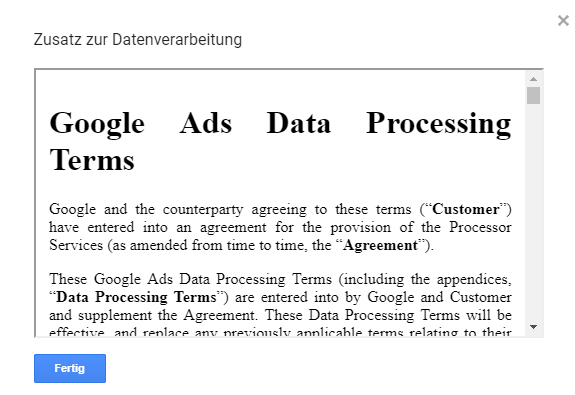
5. Data Processing Agreement
According to the GDPR, companies must enter into a Data Processing Agreement (DPA) as soon as they process personal data using service providers.
🔎Therefore, get an overview of all the tools and providers you work with and check whether appropriate agreements are already in place or if you need to set one up.
Both the service provider and you as the client are acting in violation of regulations if you do not take care of a DPA.
Do you have a DPA with the host of the conference website or the provider of the conference software?
Whenever personal data is collected on your web space or within your software, you need a DPA.
This applies, for example, to:
- Hosting the conference website
- Participant registration
- Submission of contributions
- Communication via the conference software
Have you entered into an agreement with Google?
If you use Google tools such as Google Analytics on your conference website, a DPA is also required. It can be concluded online directly in the account settings. The GDPR allows the agreement to be concluded electronically.
Do you work with service providers outside the EU?
Additional requirements apply here.
A DPA is mandatory here as well. Additionally, obtain detailed information on data protection from the provider. Check whether there is valid protection for the transfer of data.
❓Even with certifications, the legal situation is not always clear. European alternatives are often the safer choice.
6. Consent
Since the GDPR, nothing works without clear consent from website visitors. Every use of personal data requires an active and verifiable "yes."
Do you avoid pre-checked boxes?
Options like newsletter subscriptions must not be pre-selected. Users must actively decide and check the boxes themselves for the offers they wish to sign up for.
Do you use the double opt-in process?
To prevent someone from signing others up for your newsletter without their knowledge, use the double opt-in method. The owners of the email addresses will receive a message with a confirmation link. Only after they click it will their name be added to your mailing list.
Do you document user consent?
Every instance of consent must be provable. With double opt-in, this is simple: The confirmation via link is saved automatically.
Can visitors opt out?
Staying with the newsletter example: Every email must contain an unsubscribe link. Clicking it removes the person from your recipient list. This process must be no more difficult than signing up.
7. Photos and videos
Images and videos bring your conference to life online and help you promote future events. Since the GDPR, however, you should keep a few rules in mind.
Are there photo notices?
If you are taking photos and videos on-site, participants must be made aware of this.
Inform them about:
• what the photos/videos will be used for
• how long they will be stored
• what rights the participants have
📸Attorney Prof. Niko Härting recommends publishing photo notices in advance. To be on the safe side, display these notices during the conference registration process.
What do you do if a conference participant objects?
Prof. Härting also suggests that you always rely on your legitimate interest as an organizer when it comes to photo or video recordings.
Alternatively, you could obtain explicit permission from every person at the conference. However, participants can withdraw their consent at any time, which could cause problems for you.
More tips for greater security when planning your conference
Just as popular as the topic of data protection: taxes! We explain what you should keep in mind when selling tickets for your conference.
New legislation, even more confusion: But fortunately, we have an article that answers all your questions about the European Accessibility Act.
Note
This article provides an overview of the key points to consider regarding current legislation when creating a conference website. This text is not exhaustive and does not constitute legal advice. For specific questions or special regulations concerning your conference website, please consult a qualified attorney.