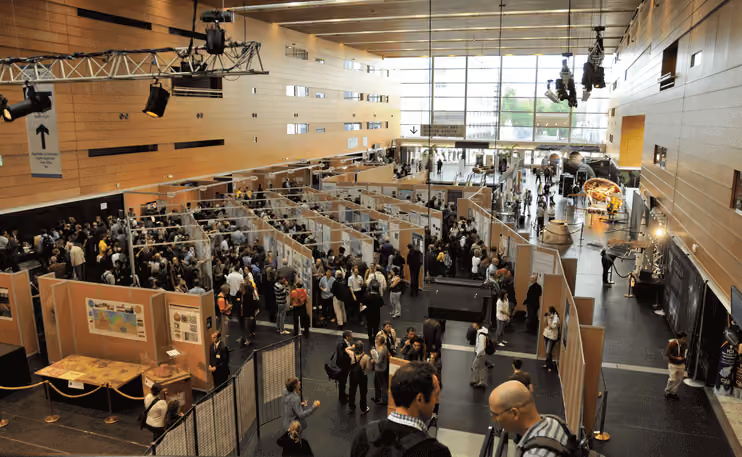
Many conference participants find presenting a poster to be a real highlight. Unlike giving a presentation to a large audience, they receive immediate feedback on their work.
The focus is on personal exchange. Spontaneous questions often lead to lively discussions. This is particularly valuable for research projects in their early stages, as new ideas can be incorporated immediately. Often, a poster is what first draws visitors' attention to a topic. It is not uncommon for this to spark the idea for a joint project.
Even if no collaboration follows, discussing the content of the poster is worthwhile. Presenting outside of your own bubble brings new perspectives and important experience. At the same time, researchers sharpen their skills: they practice explaining ideas clearly and presenting information in a visually engaging way.
Are you planning a poster session yourself? In this article, we have put together a short checklist for a successful approach.
1. Adapt the poster session to the venue
Regardless of the venue, there should be enough space for all posters. Since hundreds of contributions are often presented at conferences, it is all the more important to inquire about the room layout in advance. At the same time, clarify whether there are enough poster boards available on-site and, if necessary, arrange for rental boards, including their transport and setup.
To ensure the posters don't go unnoticed, they shouldn't be placed away from the action. You can remedy this with a simple trick: strategically place drinks and snacks near the posters to generate foot traffic and increase visibility.
Within the room itself, leave enough space between the rows of boards so that visitors can browse undisturbed, even when it gets crowded. Create a floor plan before setting up and use it to test which layout works best.
Instead of a dedicated room, wide hallways are also a good option. You certainly won't have to worry about the posters being ignored there. On the other hand, this is only suitable if there aren't too many posters or if you are using e-posters (see point 7).
2. Establish guidelines
You can avoid numerous inquiries by providing information about poster requirements in good time. Contact the poster authors directly via email. This is made easier with conference management software, which can be used to send personalized mass emails to the authors.
The email should definitely include the following information:
- What size should the poster be? Portrait or landscape? 📏
The standard format is DIN A0. The maximum size as well as the answer to the question of portrait or landscape format always depend on the poster boards. - In which language should the poster be created? 🗣️
Some organizers want to keep the conference consistent and only accept posters in the official conference language. Others leave it up to the authors. To avoid misunderstandings, specify the languages. - What information must be included on the posters? 🖊️
Think of things like the name, institution, and supervisor of the poster author as well as the cited literature. For medical congresses, notes on potential conflicts of interest should also be included.
Use the conference website to compile detailed information on poster design and the session schedule. Unfortunately, it is a sad reality that many results still resemble an abstract enlarged to poster size. Therefore, point out that the best posters are legible, informative, visually appealing, and easy for non-experts to understand. Of course, you can also simply point to expert tips. Very good ones can be found, for example, from Prof. Klaus Pommerening at JGU Mainz or in the presentation slides by Andreas Schoknecht from the Karlsruhe Institute of Technology.
Some organizers kindly offer templates for download, but this often leads to dozens of identical-looking posters on-site. Good examples are better for inspiration. For instance, link to a few successful posters or post pictures of the best posters from the previous year on your website, after asking the authors for permission.
3. Consider what needs to be done before the poster session
Nothing beats thorough preparation. It is even better if this doesn't start on the first day of the conference and doesn't just involve the organizers. Everyone who has created a poster should also know what needs to be done by then.
You should definitely keep the following in mind during preparation: ✅
- Define the timeframe for mounting the posters
- Clarify how the posters should be attached
- Provide attachment materials
- Assign a unique number to each poster
- Group them thematically if there is a large volume
- Make the layout in the poster room clearly recognizable
Authors should also be informed about when they need to be at their posters, the procedure following the presentation, and the deadline for removing their posters.
4. Plan the exact flow of the poster session
A few years ago, poster sessions typically worked like this: all scientists stood by their posters and waited for someone to show interest in their work. If someone stopped by, they would discuss the poster—otherwise, it was quite boring. While there was no requirement to give a presentation, there was also no feedback.
Fortunately, many organizers are now focusing on better session design. For instance, the poster slam method has proven successful at some events, where each author has exactly one minute to introduce their poster. This provides a short, concise introduction for all attendees, who then have the opportunity over the next hour to visit the posters that interest them and engage with the authors.
5. Organize poster tours
Small-group poster tours are another option. In this format, the group moves from one poster to the next. At each station, the author briefly presents their work, followed by time for a short discussion. For multi-day events, it is recommended to schedule one presentation per day, lasting no longer than one to two hours.

Once all presentations are finished, the poster boards do not need to be removed immediately. Give attendees the opportunity to view the results at their leisure. As a teaser, provide a poster list on the website or make it available via the app. This allows everyone to learn about the topics in advance and then specifically visit the most interesting posters later.
Ensure that posters are not photographed without permission. In the age of smartphones and social media, it happens quickly, but it can harm the researchers. Results are often preliminary and unpublished. A few signs asking people to check with the authors before taking photos can be very helpful here.
6. Reward the best posters
Many conferences offer prizes for the best posters – a great incentive for creating a high-quality poster. If you want to award prizes, you should first appoint jury members and establish clear evaluation criteria. You could evaluate aspects such as the graphic presentation of information, content, delivery, and the ability to answer questions.
Do not keep the criteria secret, as transparency can lead to better-designed posters. To reduce the workload, it is better to have the jury make a pre-selection if there are a large number of posters. Only the nominees are then evaluated during the sessions.
Present the award(s) at the closing ceremony, when all participants are gathered once more. The author of the best poster might receive a cash prize or free admission to the next conference. Sometimes winners also receive professional books or journal subscriptions. You might consider collaborating with sponsors or media partners for this.
7. Consider the specifics of e-posters
Electronic posters save space and eliminate the need for physical boards. Instead, posters are viewed on large displays. Since all posters can be displayed on a single screen, the number of monitors does not need to match the number of posters.
E-posters can be presented in various ways:
- In the simplest case, the screens just display the digital version of the poster, which would look identical in printed form.
- Sometimes, interactive elements like videos can be added, or the poster may consist of several slides, similar to a PowerPoint presentation.
If you opt for e-posters, it is even more important to inform authors about the requirements. In addition to dimensions, the permitted file formats play a crucial role. Software can help with this. For example, Converia is capable of managing e-posters and displaying them adapted to the screen size.
Have you organized poster sessions before? What was particularly important to you? Would you like to add a tip? Let us know.
Image source: EPSC-DPS poster session by smerikal (CC BY SA 2.0)