With Converia, you already have software by your side that optimally supports you in event management and ticket sales. Besides that, it never hurts to make your upcoming event a little better known beyond your own website. Take advantage of the opportunity to announce your event on XING and tell over 20 million potential interested parties in the German-speaking region about it. That is how many members the business network reaches according to its own statements (as of May 2022). The majority of them are between 20 and 49 years old, tech-savvy, brand-conscious – and potentially interested in your event.
The best part: anyone can participate. Your event does not need to meet any special requirements to be included in the XING events directory. Only one person from the organizing team needs a user account, as events can only be created by registered members.
Public and private XING events
Organizers are always faced with the initial decision of what type of event to create. Any member can attend public XING events. The event is listed in the events directory and can be found via the XING search function as well as generally "from the outside" via Google. This offers a small advantage for all organizers who use XING not only to create their events but also to maintain their contacts. In this case, there is the additional option of sending invitations to people from your own contact list or to members of a group you moderate. You can also send invitations beyond the borders of XING. Simply enter the email addresses of people you would like to have there who do not use the network.
If you do not want everyone to see your event, create a private event. This means that only invited people have access to the page and can attend the event. Another category is group XING events, which are hosted by a group and are either visible only to group members or to everyone.
In the visibility settings, there is also a middle-ground option to display an event only to logged-in users. The event is then discoverable via the XING website, but is not included in any search engine index.
In principle, creating an event on XING is quick. The entire process essentially consists of only two phases – the first is setting up the event page, and the second is sending out invitations.
Easily set up XING events
Implementing the first step could hardly be easier, as much of it is self-explanatory. The starting point is the "Organize event" button in the "Events" tab. Once you arrive at the page for creating the event, you start with the general details. Enter the title, description, as well as the start and end time here, and select the event language and the category your event belongs to. With the EventPlus option, a link to your event website also appears in the header. In general, the paid version, which can be added for 25 euros per month per event, provides you with a few additional functions. You can then enhance the detailed description with links to participant registration and paper submissions, or offer your own documents, such as the program or detailed directions, for download. A list of speakers with their XING profiles is also possible. Paying organizers can also see who has visited the page and what led XING users there. The event is also recommended to visitors of similar event pages where the organizer has not chosen a Plus version. On paid pages, such suggestions are not displayed.
However, you do not necessarily have to do without links that lead directly to participant registration or paper submission, even if you want to stick with the free option. You can still include the links in the description of your XING event, even if they cannot be clicked directly there. It is best to place the addresses at the very end of the text. If they are in the middle of the description, it disrupts the flow of the text.
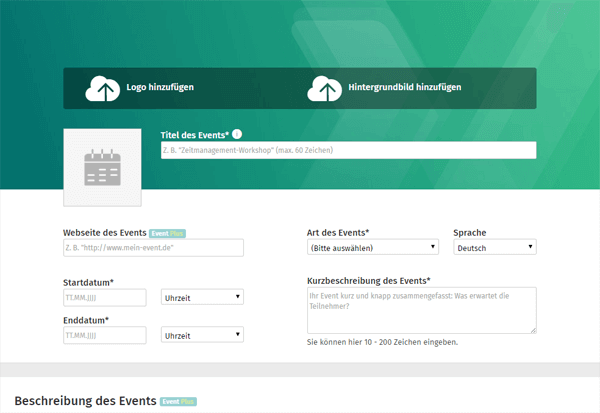
In the free version, you can also define the program in text form and keywords to make your event easier to find. There is also space for a hashtag, which should be well-received by active Twitter users among the participants, as they won't have to agree on a shorthand later to group all the tweets together.
Then decide who will be displayed as the organizer on the page. By default, this is you with your XING profile. Alternatively, a company, institution, or association can appear as the organizer, or you can enter one or more names of the people responsible yourself.
It is also important to specify where the event will take place. XING automatically provides a Google Maps link for the event as soon as the address is complete.
Because this is very informative but still a bit colorless, add a logo and a background image now. To increase brand recognition, use the same graphic as on your event website, which you can create with the help of our tips for designing a header.
The next point is particularly interesting from a strategic perspective. It is about which members XING recommends your event to. Even if you don't necessarily have to select anything here because all details are optional, you should not leave the fields blank. Displaying the event to as many members as possible does not necessarily lead to the goal. A user from the real estate industry will hardly pay attention to a pharmaceutical event, whereas someone from the medical field is more likely to. It is therefore a matter of hitting the target audience as precisely as possible. And XING helps with that: put together the ideal target group profile yourself by deciding whether your event should appear on the screens of experienced HR managers, managing directors from the cultural sector, or career starters in sales.
Before you start sending out invitations, you must make a setting regarding the guest list. If you do not want all XING members to see who you will soon be welcoming, allow access to the list only to all invitees or to no one but yourself.
If you wish, you can refer to the number of (remaining) available seats on your XING events page. If there aren't many left, your event often appears a little more tempting. Instead of putting off the decision, hesitant people usually register immediately before others beat them to it.
At this point, you could now include an option for selling tickets via XING Events. However, the platform's own registration and ticketing service, XING Events, has a limited range of functions compared to Converia. In addition to highly individual solutions for events of various sizes, Converia can be connected directly to your systems for managing payment, booking, or user data. Converia is also the better choice if you want to organize multiple events with less effort.
Invite everyone?
Then consider who you want to invite right now. Think carefully. An invitation is not a bad thing per se. However, the attitude toward all event offers can change quickly as soon as they flood the inbox in masses. Unfortunately, there are many users on XING who, to the annoyance of their contact list, are very eager to create new events and just as diligent about inviting people to them. With such an approach, you will most likely fall out of favor with some of your contacts and risk them looking for a way to block your notifications. We therefore advise you to only invite people to your XING events who you know for sure will be interested in the events. Contacts who are not part of the target group anyway are thus spared from too many unnecessary messages.
Just because you are not carrying out large-scale invitation campaigns does not mean that the fate of the page is sealed and that no one will ever wander there later. Interested parties will find your event via the XING event market, which they can search specifically for events in a certain city, a specific industry, or by a keyword. Alternatively, the entire event inventory can be browsed by event type, so that, for example, only conferences and congresses are displayed. By the way, the vast majority of all events are seminars, workshops, and lectures, which make up more than half of all XING events.
Overall, a dedicated XING Events page offers an excellent way to reach more potential attendees through multiple channels and even encourage them to register—potential you should definitely tap into.