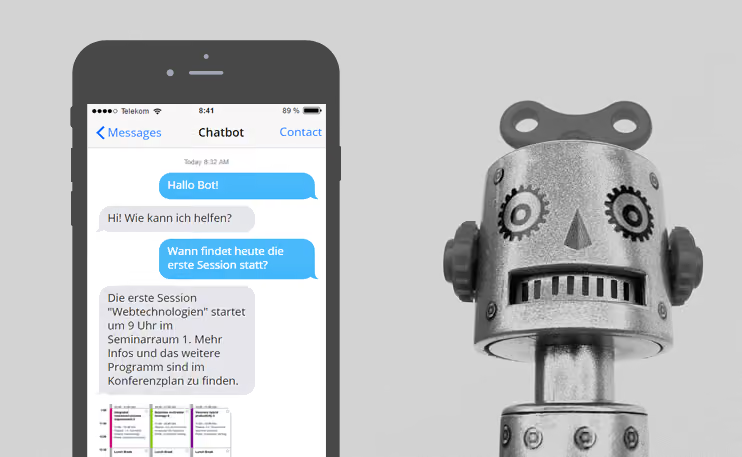
Basically, a chatbot is nothing more than a robot that performs tasks independently. Behind it is a software module capable of interacting with users. The goal is for them to feel like they are in contact with a real person, as the bot understands what its conversation partner is writing and reacts accordingly. Predefined rules determine what the answers will be. To provide the appropriate response, the bot looks for specific keywords, which it uses to identify the intent behind the user's question. The phrasing of the question is therefore secondary, as long as it contains at least one keyword. However, you should explain to users in advance to always ask only one single question and to phrase it as simply as possible. Complex inquiries with complicated sentence structures will not lead to the desired result.
By nature, bots are very capable of learning, but they need to be taught. This is made possible by databases that contain questions, answers, and keywords from which the bot draws its knowledge. The more information available, the better it works with the answers.
Chatbots are therefore practical conference assistants that also don't mind being asked the same question for the tenth time in half an hour, whereas that can become a bit exhausting for some staff on-site. Because the answer is always the same, a bot prevents inconsistent information. It ensures that participants receive answers immediately. The on-site team has more time for other tasks when answering questions is delegated to a chatbot.
It remains to be clarified how exactly the bot reacts to a question. It will only understand a question if it contains familiar words. Synonyms for these words are not automatically recognized. Beyond that, there are more advanced bots designed to capture the user's intent as accurately as possible by analyzing the grammar of the question. This works similarly to entering a question into Google, where the user is eventually shown the appropriate answer. This requires methods for Natural Language Processing (NLP). Corresponding algorithms are significantly more complex in their structure. Such a method is therefore only suitable if you have programming skills. Simple bots can be created without any programming experience.
The chatbot as a trend
But why are chatbots such a big topic right now? After all, they have been around for more than 50 years.
The reasons for this can be found in the increasing use of mobile devices. Many smartphone owners now use their phones for just about everything—except making calls. In general, phone calls have become increasingly unpopular, especially among younger people, over the last few years. Conversations that take place entirely in writing are often more practical. They allow you to decide for yourself when to continue the conversation, which fits quite well with a multitasking mentality. Only very specific matters are preferred to be settled via a phone call. Fittingly, messaging apps are now among the most popular smartphone applications in Germany.
This is where bots come into play: With the goal of integrating as many services as possible into their own offerings, Facebook, for example, has been providing the appropriate tools for creating your own bot since 2016. Users connect with a bot that the organizer has previously created themselves via Facebook Messenger.
A bot builder for everyone
In addition to a Facebook page, however, a certain amount of technical prior knowledge is required to set up the bot. As a further hurdle, the review process must be completed. This means that users cannot start chatting with the bot immediately after setup, as it must first take a multi-day detour through Facebook's own reviewing department.
More practical are tools like Chatfuel or Landbot, which help organizers create a chatbot without programming skills and integrate it into their messenger or website. During setup, you configure which phrases should trigger which response. These can be constantly expanded, so the bot gets smarter over time. Facebook recommends noting down everything in advance that users might ask and what they expect from the bot. The more questions you prepare it for, the more helpful it will be later. As soon as that is finished, you can start chatting immediately. Approval from the top level is no longer necessary.
The bot's answers do not necessarily have to consist only of text. For example, it can redirect to Google Maps, send images of floor plans, or respond with emojis. Using buttons, the user can then, for example, go directly to the overview of speakers for the desired day.
The bot will not always be able to answer. But instead of just apologizing for it, it should offer alternative solutions at that point—such as simply trying again with slightly different wording or turning to the front desk staff. TOPBOTS has created a list of skills that bots should master in order to chat more personally and effectively.
Universally gifted
However, it is important to clarify beforehand what the bot will be used for later.
For example, it could answer questions about the event. Among other things, it can reveal where to get food, when the next session starts, what the Wi-Fi password is, where the poster exhibition is located, or when the lunch break is. The function is basically similar to that of an FAQ list on a website—with the difference that no one needs to read through it to the end anymore. After all, you never know if the information you need is really in the list. The chatbot of the analytics and social media conference SAScon 2016 shows that something like this can work well in practice. The SASbot answered visitors' questions and, in that context, could also link to speakers' Twitter profiles.
Or you can use the bot (additionally) to send push notifications to participants. They then receive a message as soon as a presentation has to be canceled, has been postponed, or the presentation slides are available. A notification can also be sent to remind them of the start of a workshop or to inform them if someone has lost their ID card on-site or a key has been found.
As another possibility, it is a good idea to use the chatbot as an extension to the conference app and to conference management software in general. It provides participants with additional information, such as directions to the venue or information on where there are still free parking spaces. In the future, these could even be answers personally tailored to the user if the bot knows which events a participant has booked. The latter, however, would be more of a case for a completely independent chatbot, independent of Facebook, which is directly linked to the conference software and therefore knows the participants. For data protection reasons alone, a solution via Facebook would hardly be justifiable in that case.
It remains exciting
Truly profound conversations with a chatbot are not yet possible in the event sector because its repertoire is limited only to the phrases and signal words it knows. The bot does not know how to handle questions and sentences not contained therein, so the bot and user often still talk past each other. Facebook's long-term goal, however, is to provide bots that learn for themselves over time and become more human by being able to develop their own personality. That there are some hurdles on the way there is something Microsoft had to learn last year. Bots are also susceptible to negative influences.
In the future, a chatbot might even be able to accompany conferences from start to finish and be present during registration with additional explanations about offers or the schedule. Increased use would also be conceivable for networking. Here, bots could help visitors get into conversation with others and, for example, ask about the user's interests in order to then compare them with the LinkedIn profiles of other participants and send contact suggestions.
While future developments will determine how practical these bots are in the long run, it is already clear that they are more than just a technical gimmick at conferences that will be forgotten in a few months.