Over the past few years, our conference software has supported many medical conferences and congresses. We have observed an interesting difference compared to other types of conferences: when organizers put together the scientific program, things often work a little differently. The individual program items are not just made up of submissions received in response to a call for papers that were subsequently approved by reviewers. Instead, organizers invite speakers directly to the conference. Sometimes, individuals are well-known in a field as experts and excellent speakers and are therefore specifically targeted. Once they reach a certain level of prominence, their participation can even have a positive impact on registration numbers. When the opportunity arises, organizers are happy to take the initiative themselves.
Who is attending? Who is not?
It takes time to finalize the program with all presentations, and you shouldn't let that time go to waste. It is often pointless to wait for your preferred speakers to submit a contribution on their own. Instead, draw their attention directly to your conference with a personal invitation.
If you are thinking of elaborately designed invitation letters and the effort involved in creating them, think again. It is much faster with Converia's invitation management:
Our software provides a wide range of text templates for drafting your email. If you want to invite several people at once, use placeholders. This prevents you from having to rewrite your text for every recipient. After that, just tell Converia exactly who should receive the invitation. By the way, you can invite session chairs in addition to speakers with individual contributions. If you haven't scheduled an exact time for the session yet, you can still send the invitations.
Test how speaker management works in Converia - free of charge in our demo.
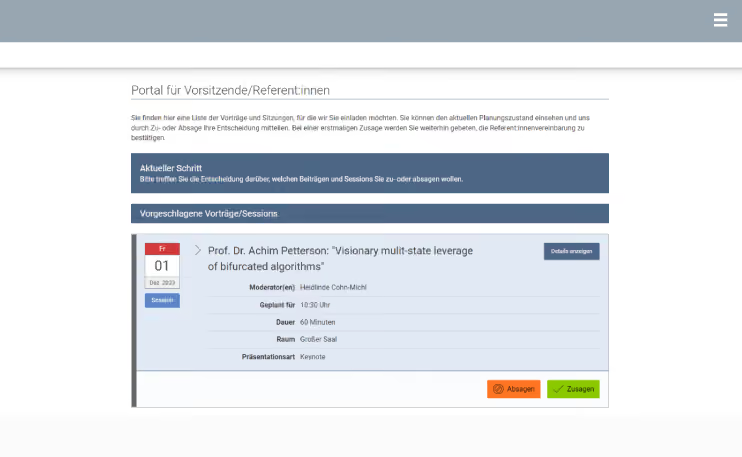
Every email contains a link that takes recipients directly to the portal for chairs and speakers. There, they will find a list of all the presentations for which you would like to invite them. By clicking one of the buttons below, they can either accept or decline the invitation. Optionally, you can attach a speaker agreement that must be accepted before the confirmation becomes final.
Organizers can also track all invitations with Converia. A master overview lists all contributions for which an invitation has already been sent or is planned for the near future. Each entry is color-coded to indicate the invitation status—whether a person is intended for an invitation, the invitation has already been sent, a confirmation or rejection has been received, or the presentation has been rescheduled. Because such a list can sometimes get quite long, a filter function is included. For example, you can display only those contributions where the speakers have already been invited but have not yet responded. If you are more interested in the invited individuals, you can switch from the contribution view to the person view. Each invited person appears there only once, even if they are scheduled for multiple presentations.
No response to the invitation? Follow up!
Because invitations often arrive unexpectedly in an inbox, it might take a few days for invitees to respond with a confirmation or rejection. Sometimes more time passes than your schedule allows. Eventually, you reach a critical point where the conference program needs to be finalized. Converia makes it easy for you to follow up. Filter the list for people who have not yet responded and draft a reminder email. This works on the same principle as writing the invitation: if you want to remind more than one person, you only need to write one message, which is then automatically sent in a personalized format to everyone you want to nudge about the conference.
A rejection is not the end
With busy people, it is quite likely that some will not be able to make the date you proposed. We have made provisions for such events as well. Designate substitutes and notify them in the same way. Forward-thinking organizers even define substitutes before it is clear whether they will need to be contacted. Once stored in the system, you can contact them whenever you like—or not at all.
First the contributions, then the speakers
You are already clear on the topics of your conference. It is a different story with the speakers. No problem—contributions and sessions can be created at any time and do not need to be assigned to a specific person right away.
As soon as you have found the right speakers, simply put them into a list. You can then import the list into Converia and assign the desired individuals to the contributions. They will then be given the status of a speaker. This way, you don't have to create each person in the system individually, which saves you a lot of work.
No matter how large or small a conference may be, invitation management is worth it. After all, it is the speakers' contributions that make for an interesting program and ensure that tickets sell like hotcakes. Converia supports you in managing your speakers and maps a very complex workflow in a way that standardizes and simplifies both communication and as many steps as possible on the way to a top-class conference program.
Is this exactly what has been missing from your events? Then let's change that together. A quick message or a call to us will bring you one step closer to a whole new way of managing invitations.