In a report from November 2018, LinkedIn first announced the resurrection of the event feature. By now, few people likely remember that the function existed previously. LinkedIn also leaves this unmentioned in its announcement. However, almost an entire year passed before the new version of the original feature, which was discontinued in 2012, officially launched. As part of a pilot program, creating new events was restricted to members in selected regions before LinkedIn began gradually rolling out the event feature to other users in October 2019.
Initially, only selected individuals were allowed to create events and send invitations. The feature for creating events on LinkedIn is now open to everyone and can therefore also be used for conferences.
What can LinkedIn's event feature do?
With this function, LinkedIn members can create a page for their own event. Such events include seminars as well as conferences or congresses. The main thing is that it is a business event and not the next private birthday party. Facebook is probably the better place for that.
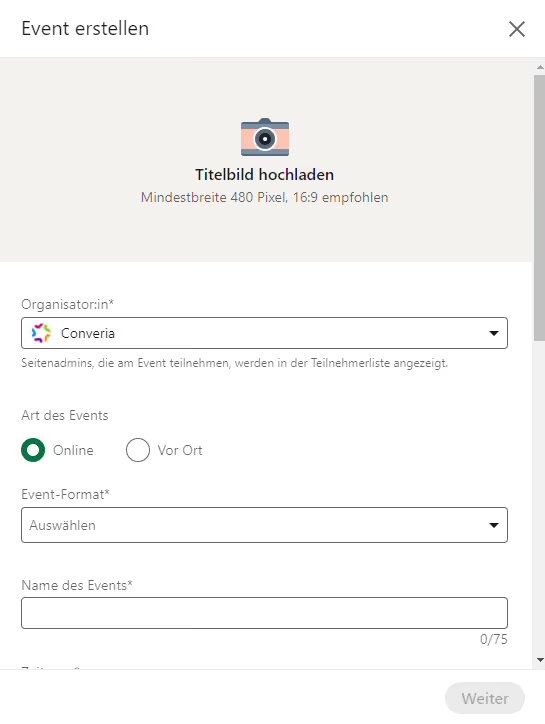
When creating a new event, a form first appears where general details about the conference can be entered.
Organizers can add the following details to their LinkedIn event:
- Cover image - LinkedIn recommends a size of 1774 x 998 pixels
- Organizer - this can be an individual with a LinkedIn profile or a page (e.g., a company or a professional association represented on LinkedIn)
- Event type - if the "In-person" option is selected, additional fields for address and venue
- Event name
- Time zone
- Start date and time - an end time can optionally be added
- External link - because ticket sales cannot be processed directly within LinkedIn, you can optionally insert a link to your website where you sell the tickets.
- Description - write a brief summary here of what your conference is about and which questions are at the center of it
- Speakers - speakers can be added here, provided they have a LinkedIn profile
Creating the page is immediately followed by inviting people to the LinkedIn event. To do this, filter your contact list according to specific criteria. Not every one of your contacts is automatically invited to an event you create. This makes sense, because as the feature becomes more popular, it could quickly degenerate into an inbox full of event spam. You can draw your entire network's attention to an event in a more unobtrusive way by creating a post. Once a person has accepted, they can also help promote the event by either writing a post for their own network or sending invitations to the event directly to their own contacts.
For each event, you can also determine whether the event page is publicly visible or only accessible to invited individuals or those with a link to the event. If you like, you can also come up with your own event hashtag, which is practical since hashtags can also be followed on LinkedIn. This makes it easier to track all posts that members write about a conference. The conversation about an event is therefore not limited exclusively to the event page, but can be continued anywhere on LinkedIn - which in turn ensures even more visibility.
How practical is a LinkedIn event for conferences?
While the LinkedIn feature can do quite a bit with its options, it is not really a revolutionary step forward compared to the previous version. Especially since most people probably don't even know it exists (again), because it is hidden rather inconspicuously in the middle of the sidebar. Perhaps you even learned about it for the first time through this article.
Yet the idea of reviving the LinkedIn event feature was not a bad one at all and is a thoroughly sensible expansion. As far as the structure of the function is concerned, LinkedIn may have glanced a little toward Facebook. The event feature there is structured very similarly. In a conference context, it seems to be even better suited to LinkedIn, precisely because private parties are left out. While this is also the case with XING's own event function, LinkedIn has the advantage of internationality here, as the member base is not limited primarily to the German-speaking region. Especially for international meetings and congresses, it is an advantage to gather all participants on a single platform. Because sharing events is so easy, people might register thanks to LinkedIn who would never have become aware of the conference without an invitation or a post in their newsfeed. With regard to the number of tickets sold, the new function can therefore also pay off financially for organizers.
Anyone who accepts the invitation also gets an overview of the other participants and consequently a good overview of who else is attending the conference. This helps everyone who might want to prepare a few topics of conversation and approach others in a targeted manner, or perhaps even discuss things before the conference begins. The opportunity to get to know each other in advance can boost networking on-site, where it is sometimes not so easy for some to make new contacts and approach people who were previously complete strangers. On the other hand – and this is another plus – the LinkedIn event function also helps to ensure that you don't lose sight of new conference contacts immediately and to engage with the content a little more instead of driving home on the last day of the event, where what you have just experienced threatens to quickly fade into everyday life. In general, the event page on LinkedIn can become a hub for all discussions and impressions surrounding the event.
LinkedIn account required
Participation in discussions on the event page is always tied to a LinkedIn login and is impossible without one. A participant who does not want to register for LinkedIn specifically for the conference is therefore excluded from the outset, which is why the network should preferably not be the only place where everyone exchanges information about the conference. If you primarily want to promote networking with the event page, that is fine – LinkedIn is perfect for that, but you should refrain from announcing exclusive or important news there that concerns all participants. As soon as there is even one person among them who does not use LinkedIn, someone would be at a disadvantage regarding the flow of information.
The LinkedIn algorithm could also become a problem. The business network promises that it will display "relevant notifications" about an event in a timely manner, but does not reveal how relevant updates are distinguished from irrelevant ones. In this respect, it is conceivable that some messages might not reach everyone if an algorithm independently weights updates. This is yet another reason to switch to other, less algorithm-driven channels for important messages (= those that organizers classify as important).
What is also missing is a mailing list function with which all participants of the LinkedIn event can be contacted personally in a targeted manner. Unfortunately, additional information about the event, such as a program overview, cannot be placed anywhere in the profile in a way that looks really nice for an event created with LinkedIn. Although there is a description field, it does not offer unlimited space, with a maximum of 5,000 characters. Anyone who has something important to communicate and does not want to rely on the newsfeed algorithm should continue to take the usual path for messages to everyone and, for example, use the email function of the conference software being used.
In its current scope, the LinkedIn event feature is hardly useful for an international congress. It cannot replace the conference website either. Smaller meetings could certainly give it a try and create a platform for exchange on LinkedIn. Otherwise, it remains to be seen what LinkedIn plans to do with the event feature in the future. Will it be further developed? Will more weight be placed on events in the future? Will LinkedIn become the central place to search for interesting conferences? How about, for example, if you were notified in your feed that someone from your contact list is attending an event that deals with a topic you are interested in? Or if event suggestions soon appear more frequently under your followed hashtags? There would be many helpful approaches for how the event function could better integrate into the usual LinkedIn experience. It remains to be hoped that the platform will pick up on some of them this time, instead of simply saying goodbye to the function quietly after a few years or letting the feature continue without further innovations.