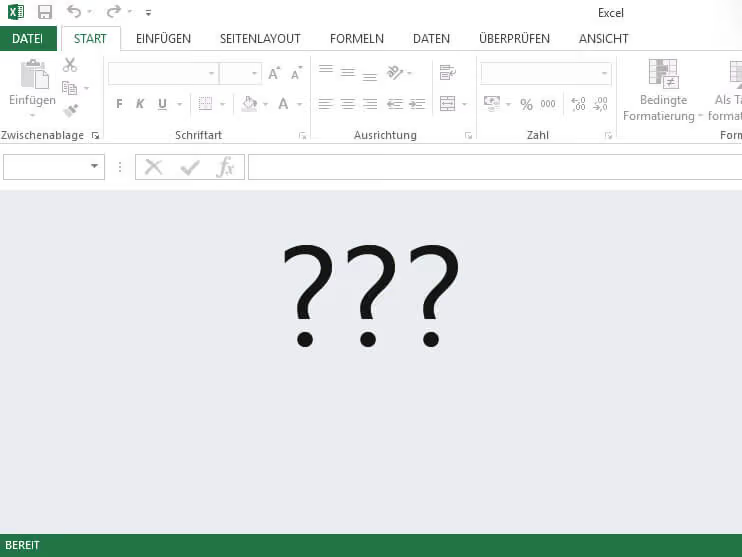
Over the past few days, we have received calls from customers reporting the same issue. While Excel exports can still be generated from Converia, users are met with a surprise upon opening the file: instead of seeing their data, they are presented with a blank screen. Since this persists even after multiple attempts, many customers are currently facing a significant problem.
We are pleased to report that we have found a solution. The difficulties are not caused by Converia; rather, it appears that Microsoft is responsible for the files appearing empty.
Previously, when opening a file from the internet, a warning would appear stating that the file might be harmful and asking if you wanted to open it anyway. Microsoft has recently removed this security prompt, and the file simply no longer displays its content.
What should you do?
You can make the data visible again by following these steps:
- Right-click the file and select "Properties".
- At the very bottom, you will see a note stating that the file came from another computer and access may have been blocked. Check the "Unblock" box.
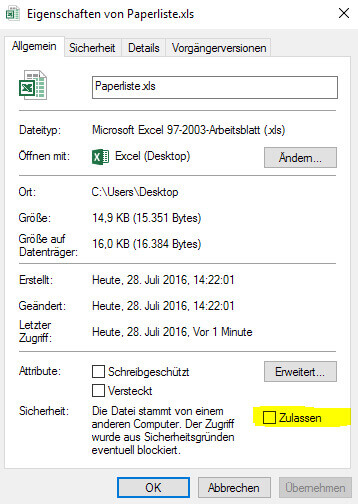
Please note that this setting must be applied individually for every new export file.
Alternatively, you can disable this block globally:
- Open Excel.
- Go to "File" and select "Options".
- Open the "Trust Center".
- Click the "Trust Center Settings..." button.
- Select "Protected View" and uncheck the box next to "Enable Protected View for files originating from the Internet".
We recommend the first method, as we cannot rule out the possibility that a file from an untrusted source might eventually end up on your computer.
Once you have adjusted the settings, your exports will display as usual. If you continue to experience issues, we are happy to assist you by phone or email. Simply reach out to us, and we will take care of it.
For further questions, it is always worth taking a look at the Converia manual.