Slack
Are you still emailing, or are you already using Slack? Instead of sending a mass email to inform all conference staff about something, you could simply post a message in the appropriate Slack channel. The advantages of this instant messaging service? Even if a team member joins the channel later—for example, because they are new—they can see all the messages written previously and are immediately up to date. Furthermore, side conversations and follow-up questions arising from a message can be handled in a thread. By default, only those participating in the thread are notified of new messages there. Everyone else can read along if they wish, but they have to expand the thread first.
In our company, we have different channels, for example for project management and development. Everyone is in the channels they need, and information for everyone is announced in the general channel. This saves us from sending daily emails to all employees. In addition to channels, you can also message people directly, just like you are used to with email. Similar to attachments, you can also send files directly to a person or a channel in Slack.
At a conference, you often have little time on-site to clarify important information with the team. Compared to phone calls and emails, Slack proves to be practical: everyone on the team stays up to date on important changes and deviations from the plan, and follow-up questions—for example, regarding registration or check-in—can be seen and answered by everyone.
Slack is software that can be installed on your desktop or as an app on your phone. The basic version is free, but for €6.25/month, you can upgrade the communication tool and gain access to the entire message archive.
Asana
For us, Asana is not just a yoga pose, but also a versatile tool for task distribution within the company. Instead of manually keeping our to-do lists up to date and spending a long time coordinating who gets which task, we use this online tool for our task lists.
Each task is assigned to a person, who then has it on their own to-do list, and has a deadline by which it should be completed. It has a title and a description. Additionally, tasks can be assigned to projects. For every conference we manage, we have a project under which we group the associated tasks. Multiple employees can have access to groups, or they can be private, meaning only those invited can see the tasks. These large task lists become even clearer when they are organized by topic.
The groups are also practical for another function: many of the conferences we manage involve the same recurring tasks. That is why we have a template with task lists that we can duplicate and use again and again. This feature should be particularly pleasing to organizers of recurring conferences.
Subtasks are also practical; they can function as entire tasks themselves or as a checklist to ensure everything has been considered for a main task. Once all the boxes are checked, they turn green, and the task itself can also be marked as complete. It then disappears from the to-do list, and you can move on to the next task.
Coordinating who is responsible for which part of the project is also simple. Everyone can assign tasks to themselves and others, which then land on the respective to-do lists. For example, if a member of the project management team is asked to adjust wording or change a color, they simply create a task and assign it to the relevant employee, who then sees it and can complete it. This has allowed us to reduce internal emails to a minimum.
Even tasks that are far in the future have a deadline, and as it approaches, it appears among the other daily tasks so it is not forgotten. Files can also be attached to tasks, and comments can be left under them. This way, employees passing tasks back and forth can easily and clearly share relevant information. Unlike with Slack or email, the employee immediately knows which project and task it concerns and what still needs to be done. Up to 15 employees can form a team in Asana for free; after that, plans start at €9.99/month. The tool is available in the browser.
Trello
What Asana is for our project management, Trello is for marketing. You can also use it to coordinate tasks within the team. Instead of projects, there are boards with lists that contain cards—a different approach to the same problem.
For example, you could have a board for your conference blog. In the first list, ideas would be collected, with one idea per card. Once the idea has been discussed by the group, it is moved to the next list, for example, to become a drafted blog post. Once that is done, the posts ready for publication move to the second-to-last list, and when everything is finished, they move to the "Done" list. Unlike in Asana, the completed tasks remain visible on the board.
Like tasks in Asana, cards have a title and a description. Files can be attached to them, and comments can be added just the same. With Trello, conference organizers can also coordinate tasks within their team. The tool is available for free in the browser or as an app.
Toggl
What actually cost us how much time during the last conference planning? Many organizers have surely asked themselves this when starting to plan their second conference. If you track your time the first time around, you will have the answers the second time. Time tracking is very simple with Toggl: click the button, and the clock starts running.
Tasks can be assigned to the time period. For us, this looks like a project manager talking to a client and logging that time under the task "Project Management" or "Support" for the respective project. Later, we have an overview of how much time we spent on each conference. Conference planners can use this to increase their effectiveness: if, for example, a relatively small planning task consumes large amounts of employee time, you should consider next time whether it is worth it again.
Toggl is free to use, with an upgrade available for $9/month. It is available in the browser, as desktop software, and as an app.
Zammad
Especially useful for PCOs: Zammad, an alternative to email for client communication. When answering customer questions and helping with challenges, emails pile up quickly, especially when coordinating multiple events. With Zammad, customer inquiries are collected and organized in one place. While emails require coordination to see who is handling which support request, Zammad tickets can be easily assigned to specific people. Finding specific tickets is also easier thanks to ticket numbers; you simply share the number with a colleague, and they can find it immediately. This shortens response times and streamlines communication.
Whenever a customer writes to us via Zammad, the ticket is set to "open." When a team member answers, they have several options. They can close the ticket if there are no further questions (though a reply from the customer can reopen it). The team member can also close it at a specific time or set a reminder for a certain date. Then, they can simply check back to see if the ticket has been answered. Naturally, you are also notified of any new replies.
Another noteworthy feature is the ability for team members to add internal comments to tickets that are invisible to customers. For example, if a colleague other than the one communicating with the customer has made a requested adjustment, they can simply note it in a comment, putting the information directly at the responder's fingertips.
Zammad is available as open-source software for various operating systems, and for Windows and Mac starting at €5/month.
Converia
Converia is the Swiss Army knife of conference software: whether it's attendee registration, payment processing, or abstract submission and review, Converia combines everything into a single solution.
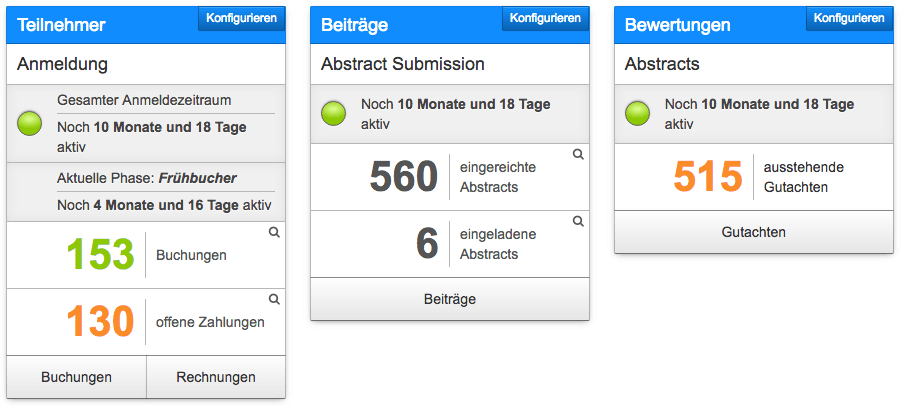
Need a clear overview? With Converia, you can see all your conference data at a glance. How many attendees have already paid? How many student IDs still need to be verified? How many abstracts are still waiting for reviewer feedback? All facts and figures are clearly summarized on the dashboard.
Imagine having to keep an Excel list of over 1,000 attendees up to date. A nightmare?
With Converia, you can sleep soundly again because the system does most of the work for you. Personal data is captured during registration, and you can view all bookings and invoices at any time and export them to standard formats—perfect for accounting.
Converia offers modules for every phase of conference organization and planning. Whether it's the flexible offer wizard, which makes mapping even complex pricing structures a breeze, or the abstract submission and review process, where submission formats and evaluation criteria are fully customizable.
We use Converia ourselves every day to support conference organizers by configuring and setting up the software for our clients.
Converia can be used directly in your browser and might be just right for your conference, too.